Skip to content
CrispOverlays
Nice list stream alert overlay for OBS and Streamlabs — Nice-list alert · Christmas
Stream alert · Nice list

Nice list stream alert overlay for OBS & Streamlabs

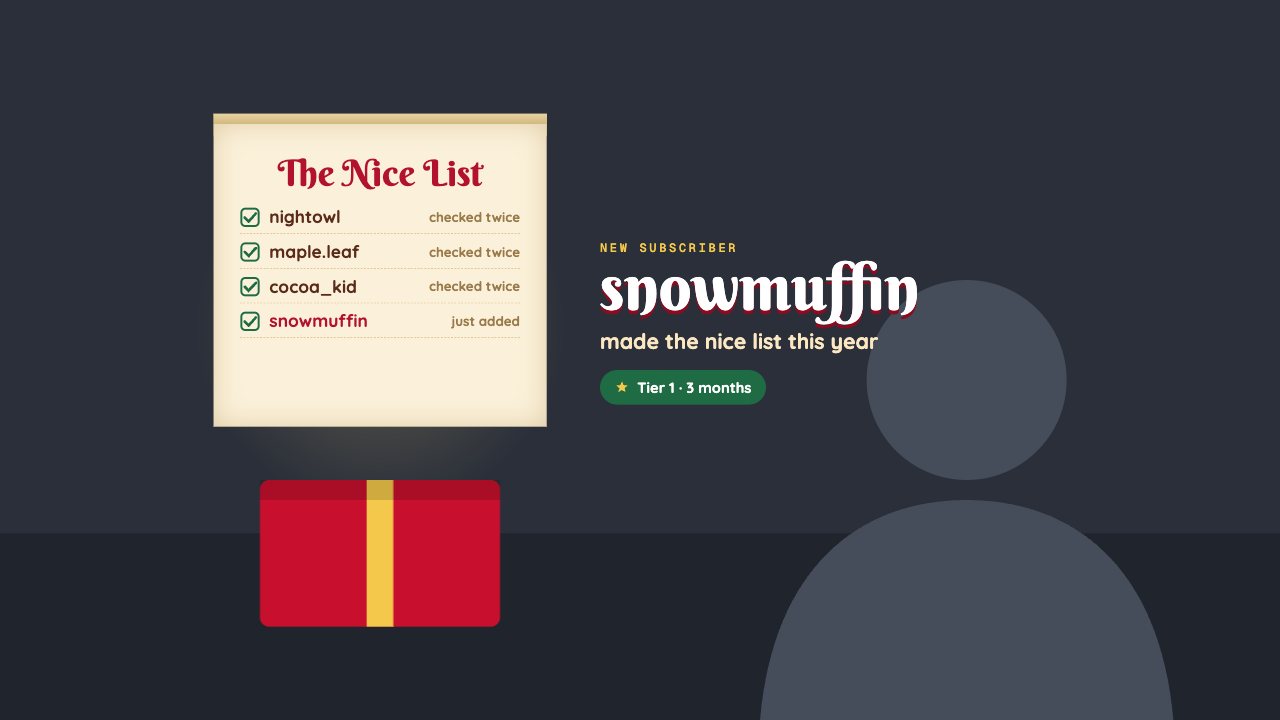
A Christmas alert: a scroll unrolls, the new supporter is ticked onto the Nice List and a present bursts open. Recent names stay on the list.

Included in Creator and up

Editable settings
9
Live controls
5
Resolution
1080p & 4K
Background
Transparent

About this stream alert

Nice List is the festive alert for December: a parchment scroll unrolls, the newest supporter is ticked off and a present pops open.

Recent supporters stay on the list as “checked twice”, and alerts queue so nobody is missed.

CrispOverlays alerts queue automatically, show each one for as long as you choose, and replay their entrance animation every time. Fire a test alert or a custom alert from the remote with one tap.

What you can customise

Text & content

  • Scroll title
  • Alert label
  • Line below name
  • Sample name
  • Sample detail
  • Earlier names note
  • New name note

Behaviour

  • Show each alert for
  • Keep recent names on the list

Live controls on your phone

Every button works from the studio, the phone remote or a producer link — and every screen updates together.

  • Show
  • Hide
  • Add to the nice list
  • Test alert
  • Clear queue

Nice list stream alert: questions

How do I add the Nice list stream alert to OBS?

Click “Use this overlay” and sign in — it’s added to your first stream. Copy your stream’s browser source URL. In OBS Studio or Streamlabs, add a Browser source, paste the URL and set 1920 × 1080. Edit the overlay in CrispOverlays or on your phone — changes appear live.

Can I change the Nice list stream alert while I’m live?

Yes. All 9 settings — scroll title, alert label, line below name, sample name and more — update on stream the moment you change them, from your computer or phone.

Is the Nice list stream alert free?

It’s included in creator and up. You can preview it free and upgrade from $2.99/month.

Do alerts queue if several come in at once?

Yes. Alerts play one after another with a short gap so each entrance animation replays.

Can I test an alert before going live?

Yes. Press Test alert in the studio or on the remote to see it on stream.

Put the Nice list stream alert on your stream

Free plan · No download · Works in any app with a browser source.

Create your first overlay — free