Quiz · Buzzer round
Buzzer round quiz overlay overlay for OBS & Streamlabs
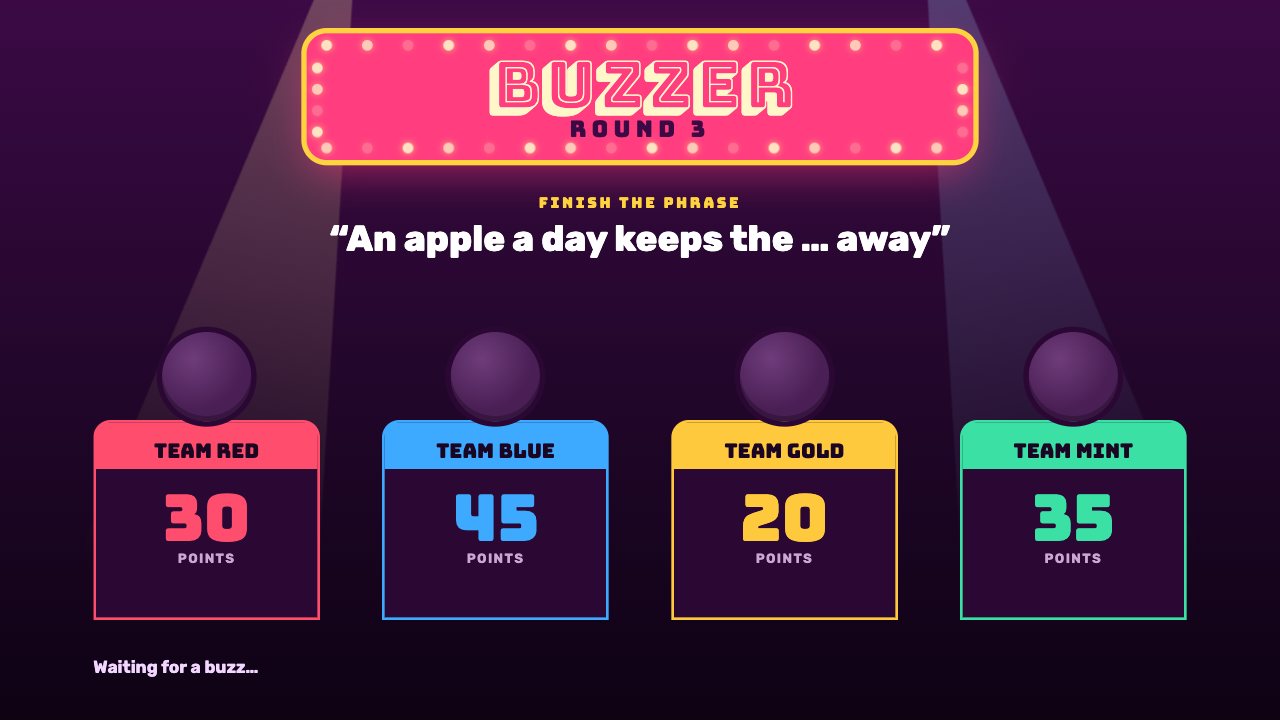
A game-show buzzer round with marquee lights, sweeping spotlights and four team podiums that light up when they buzz. Score answers from your phone.
Included in Studio
- Editable settings
- 9
- Live controls
- 8
- Resolution
- 1080p & 4K
- Background
- Transparent
About this quiz overlay
Buzzer Round brings a TV quiz to your stream: marquee bulbs chase, spotlights sweep and each team has a podium with a glowing buzzer lamp.
Mark who buzzed, then tap Correct or Wrong — scores, the round number and the status line update for everyone.
Start the timer, reveal answers and score teams from your phone — every screen updates instantly.
What you can customise
Text & content
- Round
- Prompt label
- Prompt
- Answer (shown after a correct buzz)
- Teams
- Waiting line
- Points label
Behaviour
- Points for a right answer
- Points lost for a wrong answer
Live controls on your phone
Every button works from the studio, the phone remote or a producer link — and every screen updates together.
- Show
- Hide
- Team buzzed
- Correct
- Wrong
- Open buzzers
- Give points
- Reset scores